 Store Art Studio
Store Art Studio
Studio-grade App Store and Google Play screenshots, rendered from your own app's real views, in every language you sell in.
Product Page Information
The assets below show what a finished set looks like. Every screen is the app's real UI with real data, rendered from its own views or redrawn at its own sizes, in the language you pick. Learn more…
Customize your app's product page and how it appears in App Store search results using creative assets. See best practices
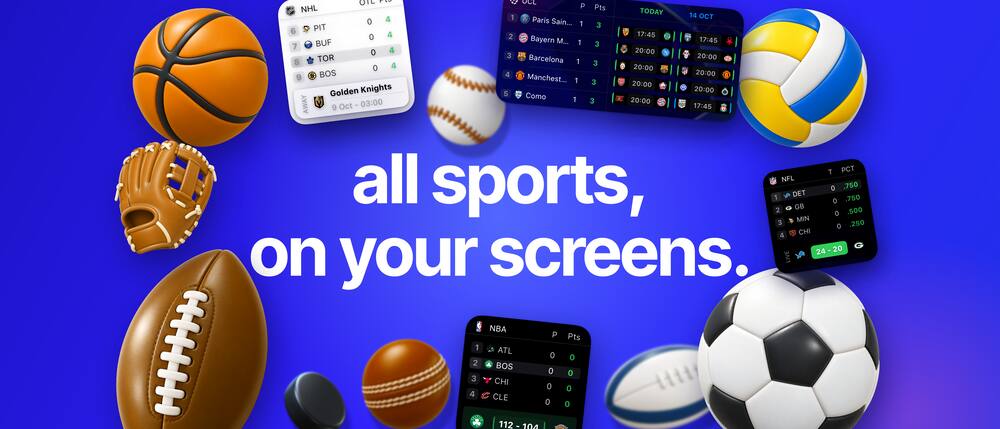 iPhone shows only this middle part
3840 x 1646, PNG, no alpha. Press Preview to see what an iPhone crops away. Keep the headline and every readable word inside x 520 to 3320.
How it works
Four layers, one rule each. A model never draws your UI, and a design tool never drifts from your app.
Truth
Your real views, rendered host-less from your data.
Atmosphere
Higgsfield makes objects, stickers, hands and light.
Page
Headline, pill, background and layout in code, placed by baseline.
Delivery
fastlane and the store APIs, with an approval list.
Before you start
docs/android-end-to-end.md walks the seven phases with short prompts and ends with the Play submission checklist: Wear OS screenshots and the AI asset declaration.
Never launch your real app to take a screenshot. An app that syncs state can overwrite real keychains and saved data. This pipeline renders views from sample data in a test bundle with no host app.
Install the skill
Clone it where Claude Code looks
git clone https://github.com/halilyuce/store-art-studio.git ~/.claude/skills/store-art-studio
git clone https://github.com/halilyuce/store-art-studio.git .claude/skills/store-art-studio
To update later: git -C ~/.claude/skills/store-art-studio pull. No git? Download the zip and copy the unzipped folder to the same place, named store-art-studio.
Restart Claude Code and check it is there
Ask: "Is the store-art-studio skill available?" It should answer with the skill and its description. If not, the file must be at skills/store-art-studio/SKILL.md, not one folder deeper.
Connect Higgsfield
Add the Higgsfield MCP server the way Higgsfield documents it, then run /mcp in Claude Code and authenticate. Ask Claude to check your balance. The skill asks before any step costs more than your budget (default 40 credits).
Add to your XcodeGradle project
your-repo/
+ StoreArt/                       the render target (test bundle)
+   StoreArtKit.swift             canvas, render(), fonts, placement
+   StoreArtChrome.swift          status bar, device bezel
+   StoreArtPage.swift            palette, headline, pill, body
+   SampleSlot.swift              one complete sample slot
+   StoreArtRenderTests.swift     one testXxx per slot, width tests
+   Fonts/  Art/bezels/ (you add)  Output/ (created on render)
+ scripts/screenshots/render.sh   runs one test on a dedicated simulator
+ scripts/screenshots/tools/      chromakey, compare, probe, verify-export
  MyApp/  Widgets/  ...           untouched
Copy the template and scripts in
SKILL=~/.claude/skills/store-art-studio
mkdir -p StoreArt scripts/screenshots/tools
cp -R $SKILL/templates/ios/* StoreArt/
mv StoreArt/render.sh scripts/screenshots/render.sh
cp $SKILL/scripts/* scripts/screenshots/tools/
printf 'StoreArt/Art/bezels/\nStoreArt/Output/\nbuild/\n' >> .gitignore
Create a unit test target with no host app
Xcode: File, New, Target, Unit Testing Bundle, named StoreArt. In General set Host Application to None. That is what makes it safe: no app is installed or launched. Set its minimum deployment target to iOS 18 (the page background uses MeshGradient).
Give it the views you want to render
- Add
StoreArt/*.swiftto the new target. - Add the Swift files of the screens, widgets or activities you want in screenshots to the target's membership.
- Do not add your
@mainapp entry point, or anything that touches the Keychain or a live account. - Add your
Localizable.stringsand asset catalogs to its resources, then enableStoreArt.forwardMainBundle()insetUp.
By hand: a file reference, a group entry, a build file and a Sources entry per file, with fresh 24-character hex ids. Build after each edit. Do not use the xcodeproj gem, it re-sorts the file and can drop entries. Or ask Claude to hand-edit the pbxproj for you.
Pin the time zone in the scheme
Edit the StoreArt scheme, Test, Arguments, Environment Variables: TZ = America/Chicago, or change StoreArt.timeZone in StoreArtKit.swift. The test fails on purpose when the two disagree, so a clock never drifts.
Edit the top of render.sh
PROJECT="MyApp.xcodeproj"            # or use -workspace below
SCHEME="StoreArt"
TEST_TARGET="StoreArt"
TEST_CLASS="StoreArtRenderTests"
SIM_NAME="StoreArt iPhone 17 Pro Max"  # created on first run, never has your app
Drop in the bezel
Put Apple's iPhone 17 Pro Max, Deep Blue, portrait PNG in StoreArt/Art/bezels/. For another file, edit BezelSpec in StoreArtChrome.swift (size, screen hole, corner radius). Without it the template draws a plain dark frame.
The Android pipeline is proven on one production app: real composables and Glance widgets rendered by Paparazzi, an HTML page layer, a full Play set. The template in templates/android is that pipeline made generic, and it was built and rendered as it ships in a separate host app. An upload to a real Play listing from the template is not yet proven. If something breaks, the skill records it under "What broke" so the next developer does not hit it.
What the template gives you, file by file
| iOS template | Android counterpart | Job |
|---|---|---|
StoreArtKit.swift | storeart/.../StoreArtSupport.kt | Paparazzi at 412 x 915 dp and 3x, transparent theme, image files with loud failure, 12/24 h, RTL, PNG output |
| Widget and activity tiles | StoreArtSupport.kt | Real Glance widgets through GlanceRemoteViews and an AppWidgetHostView, Material You from a wallpaper |
| Sample data | storeart/.../SampleWorld.kt | The frozen world: one per market from your config, one fixed moment, aggregates computed from records |
StoreArtRenderTests.swift | SampleSurfacesTest.kt | One card, one widget, one screen, light and dark, once per market in your config |
StoreArtPage.swift, SampleSlot.swift | page/slots.html, kit.css, copy.js | HTML page layer: headline by baseline, pill, phone, status bar, width test |
render.sh | page/tools/render.sh, storeart/scripts/export.sh | Renders the surfaces and the slots, lists the PNGs |
Copy the template into your repo
SKILL=~/.claude/skills/store-art-studio
mkdir -p store/tools
cp $SKILL/templates/android/storeart.config.json store/
cp -R $SKILL/templates/android/page store/page
cp -R $SKILL/templates/android/storeart storeart
cp $SKILL/scripts/* store/tools/
Then add include(":storeart") to your settings and merge storeart/libs.versions.snippet.toml into your catalog, or let the agent do it once it has read your versions. store/storeart.config.json is the only list of markets, and its surfaces says what your app has: screens always, widgets, a live notification, Wear OS or a tablet layout only if you ship them. You own it.
Let the agent read your build first
It checks AGP, Kotlin, the Compose BOM, the JDK and any screenshot library you use, then tells you its choice and the dependency changes before editing any Gradle file. If you have Paparazzi or Roborazzi it uses that. It will not add two.
Decide where the code lives
The template is a dedicated test-only module, storeart/, that depends on the modules holding your composables; nothing depends on it. The agent proposes where it goes, you answer. Shipping app code only gains small seams (plain state in, a clock parameter).
Give it fakes, not a live app
Screens are rendered from sample data. If a screen needs a ViewModel, the agent gives it a fake and tells you. No network, no account, no signed-in emulator.
Paste the starter prompt
From your Android project's root, with the skill installed:
Use the store-art-studio skill for Google Play, following docs/android-end-to-end.md and
templates/android/START-HERE.md in the skill folder.

1. Discover: read this project (modules, navigation and screens, view models, the manifest,
   widgets, notifications, Wear OS, string files per locale, brand, any fastlane metadata) and
   summarise what you found. Do not build or run anything.
2. Ask me only what the project cannot answer, in batches with your recommended option first:
   features and their order, surfaces to show, design direction, first market, my copy rules,
   the art budget and kind, who uploads.
3. Write docs/screenshots/brief.md and store/storeart.config.json (my first market only,
   "upload": false, "surfaces" as I chose), then stop for my approval.

Before you edit any Gradle file in Gate 0, tell me what this project uses (AGP, Kotlin, compileSdk,
Compose BOM, Glance, Coil, JDK, any screenshot library) and the exact changes, and wait. Never run
my real app, an emulator signed in to a real account, or anything that syncs.
Check Gate 0 yourself
The agent must stop and show you all five. Do not approve without them:
- The sample slot, 1080 x 1920, opaque, which it opened and looked at.
- One of your real screens rendered from sample data, offline.
- The same slot in two locales with different strings and number formats.
verify-export.shpassing on the output.- A list of what broke, also written into
references/android-compose.md.
Shape of the Gradle test, for orientation only
Versions and DeviceConfig fields change between releases, so the agent verifies these against your versions.
plugins { id("app.cash.paparazzi") version "<latest compatible>" }

class StoreArtTest {
  @get:Rule val paparazzi = Paparazzi(deviceConfig = /* 1080 x 1920 px, density 3.0 */)
  @Test fun sample() { paparazzi.snapshot { SampleSlot() } }
}First run
Render the sample
scripts/screenshots/render.sh Sample
The first run creates the simulator "StoreArt iPhone 17 Pro Max" and builds. It writes StoreArt/Output/default_en-US_iphone_01.png.
Verify the file
scripts/screenshots/tools/verify-export.sh StoreArt/Output 1320x2868
sips -g pixelWidth -g pixelHeight -g hasAlpha StoreArt/Output/default_en-US_iphone_01.png
Expect 1320, 2868 and hasAlpha: no.
Open the PNG and compare

You should see a pastel page, a two-line headline with a pill, two lines of body copy and a phone with a placeholder screen. That image was rendered by the shipped template on an iOS 26 simulator. The pill's tile is empty because no glyph exists yet. You will generate one with Higgsfield in your first job.
Put one of your real views in
private struct SampleScreen: View {
    var body: some View {
        MyHomeView(model: .sample)      // your real view, fed with sample data
            .environment(\.colorScheme, .light)
    }
}
If it needs onAppear, .task or remote images, those never run in a render. Pass the data in through the model. The full list of traps is in references/ios-swiftui-renderer.md.
Render the sample slot
python3 storeart/scripts/fetch_logos.py
./gradlew :storeart:testDebugUnitTest --tests '*WorldsTest'
storeart/scripts/export.sh
store/page/tools/render-all.sh
store/page/tools/widthtest.sh && store/page/tools/widthtest.sh --negative
Surfaces land in storeart/build/storeart/<code>/, slots in store/page/out/<locale>/: 1080 x 1920 slots and a 1024 x 500 feature graphic. Only the config's default market renders unless you ask for more.
Verify the file
store/tools/verify-export.sh store/page/out 1080x1920 1024x500
Google Play wants each side between 320 and 3840 px, the long side at most twice the short one, JPEG or 24-bit PNG, no alpha, 8 MB at most, 2 to 8 screenshots. A 20:9 screen is not a valid shot as is, which is why slots are 9:16. Check the current Play Console help page before you upload.
Render one real screen offline
One of your own composables, from sample data, with no network. Render it at a realistic phone size (about 412 x 915 dp) and scale it into the slot. If your app has a Wear OS app or tile and the config lists "wear", WearSurfacesTest also writes square, opaque wear_01_tile and wear_02_list for the Wear OS listing.
Know where you are heading
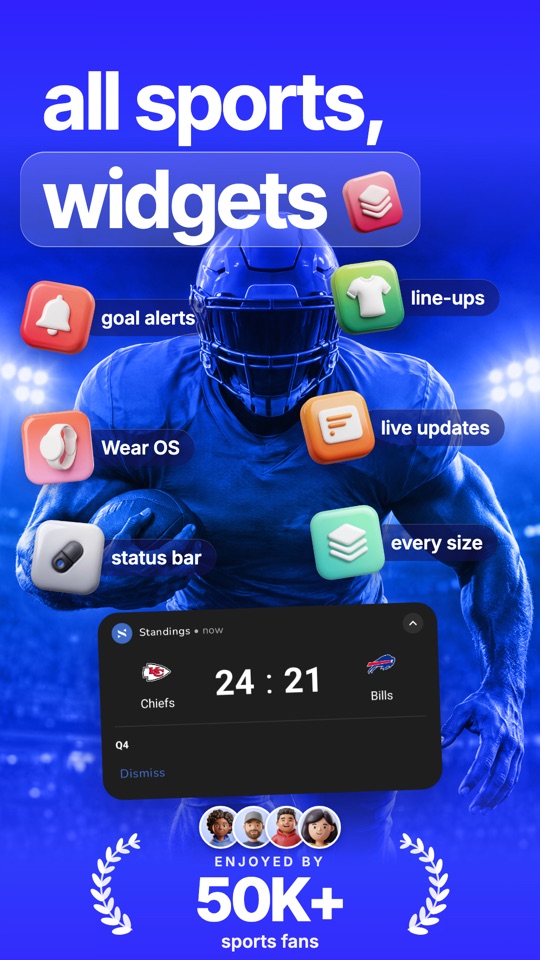
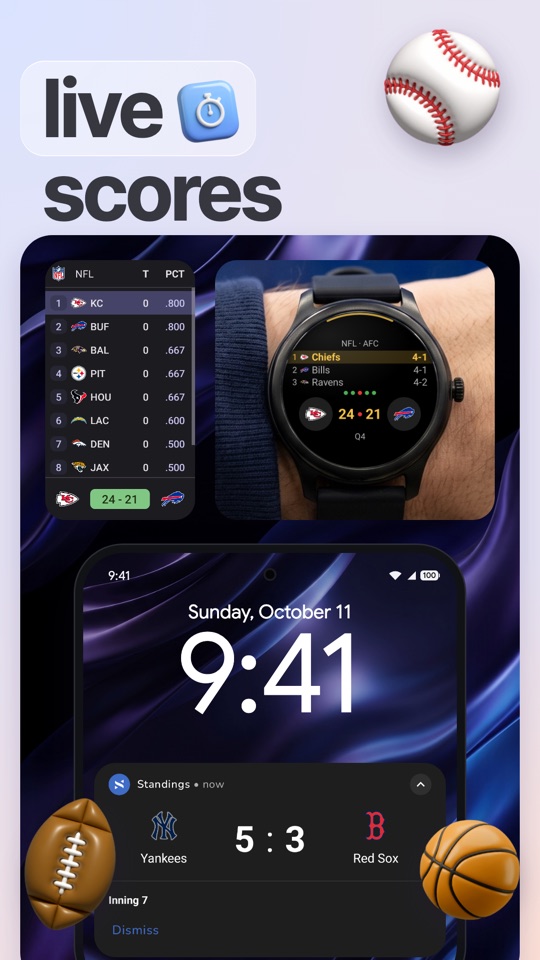
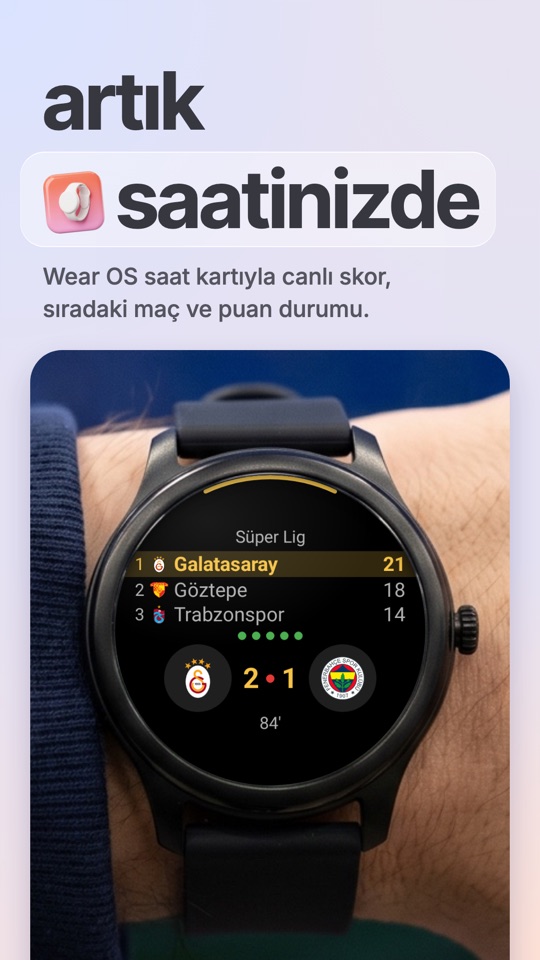
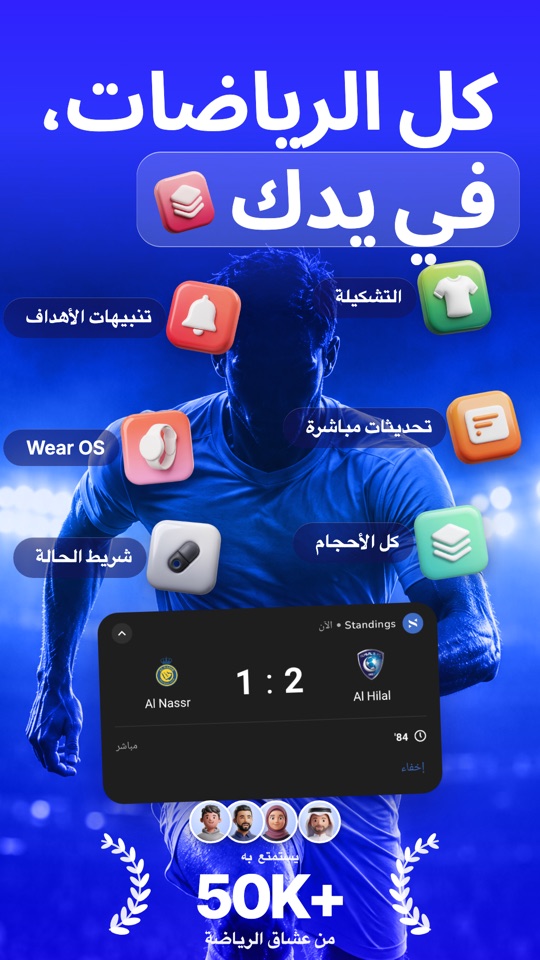
A finished run on a real app, Standings for Android: real Compose screens, Glance widgets, the live notification and the Wear OS tile, rendered with Paparazzi in 11 languages. The template's sample is plain on purpose; your screens, design and markets replace it.
Your first job
Discover, ask, brief
Start with the prompt below. The agent reads your screens, widgets, watch targets, locales and brand, asks structured questions (features and order, design, first market, your copy rules, art budget, who uploads) and writes docs/screenshots/brief.md. You edit and approve it. Prefer to write it yourself? Fill templates/brief-template.md there and say "start at Gate 0".
Start the session
Use the store-art-studio skill. Discover this project, ask me what you cannot read
from it, and write the brief.
Platform: iOS, iPhone 6.9".Platform: Android, Google Play phone screenshots.
Approve one gate at a time
Each gate ends with what rendered, what differs from your reference, the credits spent and left, what was redrawn instead of rendered, and the decisions needed. Roll out locales only after the default market is approved. See History for the six gates.
History
| Gate | What you get | You approve |
|---|---|---|
| Gate 0 Setup | Render target, a contact sheet of every real view you need in light and dark, a plan with a credit estimate | The plan and the contact sheet |
| Gate 1 Style tile | Palette, type, pill, device, and one calibration slot. Chrome checked against a real simulator, not memory | The look |
| Gate 2 Hero and hard slots | The hero, plus any slot with hands, warps or scenes. Slots that risk a store guideline are named in one line | Slots at risk, straight variants or not |
| Gate 3 The set | The remaining slots, then all of them side by side at store-thumbnail size | The story across the first three slots |
| Gate 4 Localize | One market at a time: data, time zone, language, transcreated copy, width tests | Each market, and which copy needs native review |
| Gate 5 Deliver | verify-export, then an upload to a target that cannot go live, pulled back and compared | Locales on the approval list |
The review loop
Before any render reaches you, the agent does this every time.
1. Look
Open the PNG, then look again at about 300 px wide. If the point of the slot is gone, it fails.
2. Measure
With a reference: compare.swift puts reference and render side by side with shared guides. probe.swift measures colours, ink bounds and text rows.
3. List and fix
Every difference by category: palette, type, margins, pill, device, depth, light, empty areas. Fix and repeat until minor.
Hard rules
.txt: model id, prompt, seed, generation id, credits.Troubleshooting
Strings print as raw keys
Bundle.main is the test runner. Call StoreArt.forwardMainBundle() in setUp and add your Localizable.strings to the target's resources. Overriding localizedString alone fixes .localized but not Text("key").
"Font ... did not register"
The PostScript name in StoreArtFace does not match the file. Check it with UIFont(name:size:). Use static font instances, not variable fonts.
"The process runs in ... but StoreArt.timeZone is ..."
Set TZ in the StoreArt scheme's test environment, or change the constant.
A widget has no background, or a progress bar is a yellow box
containerBackground draws nothing host-less, so the template paints the tile itself. A UIKit-backed ProgressView needs a custom ProgressViewStyle. Frosted materials do not blur; .blur does.
Xcode complains about a stale module cache after render.sh
render.sh uses its own build/StoreArtDerivedData. Do not point it at Xcode's DerivedData.
The phone is a plain dark frame
The bezel PNG is missing or named differently from BezelSpec.name.
The whole slot shifts when I add one layer
A placed(x:) at a negative or oversize position widens the ZStack. Use .placed(x: 0, y: 0).offsetPx(...) for anything that starts off the canvas.
Paparazzi will not build
Paparazzi releases pin a Gradle, compileSdk and JDK range. Check the release notes against your build before upgrading either.
Widget crashes, images missing, or decodeFile returns null
Use Paparazzi(appCompatEnabled = false), decode with BitmapFactory.decodeByteArray, and decode every image on the test thread. The template does all three. The JVM aborting with no stack trace is background-thread decoding.
A test fails with "No image file for ..."
By design: a blank image must never ship. Add the URL to logos.json and run fetch_logos.py.
A figure like "-12%" is reordered in a right to left slot
Wrap the figure in the .num class (unicode-bidi: isolate).
"Could not locate Gemfile"
fastlane is a Homebrew install. Run fastlane, not bundle exec fastlane.
The upload lane refuses a locale
It is not "upload": true in storeart.config.json, or not staged (stage-play.sh), or the language does not exist on the Play listing yet.
A screen needs a ViewModel, network or a login
Give it a seam that takes plain state and sample data. If that cannot be done, tell the agent to redraw that screen at the app's own sizes from the same payloads, and expect it to say so.
The agent stopped at a session limit
Resume that agent and tell it where it stopped. A new agent repeats the work and spends credits again.
Every trap with its fix: "What broke" and "Tooling and delivery" in references/android-compose.md.
A headline does not fit in some language
Never shrink the type. Shorten the wording: a shorter synonym, a shorter structure, or drop the lead word. The width test exists to enforce this.
Higgsfield calls are not available
Start a fresh foreground session after adding the server, run /mcp and authenticate. Background or child sessions may not load a server added later; a headless claude -p with only the Higgsfield tools allowed works as a bridge.
Higgsfield answers 429
A rate limit. Wait and retry the same model. Never switch models silently: the set would mix two looks.
The key colour is off, or white around the key
Sample the real key inside the frame, not at a corner. A flat light background the model returned instead of the key: edgekey.swift.
A red subject turned brown after keying
The default despill removes the key colour's direction. Key it with --spill 0, or generate it on solid green.
Copy reads translated
It is probably transcreated, not native-reviewed. Ask the agent which locales you can read and review those. Never ask a non-native to sign off.
Match a Set
What it takes
Composition, margins, baselines, type scale, tracking, palette relationships, device scale, depth and the rhythm across the set.
What it never takes
The other brand, its copy, icons, photography or app UI. Your app and your content go in their place.
The compare loop
compare.swift draws the same guides across the reference and your render, so margins and baselines are checked by eye and by number.
cut to slots at native size
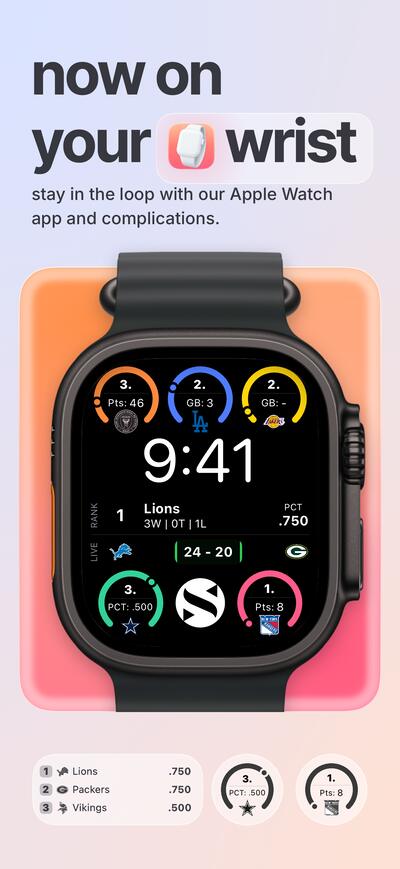
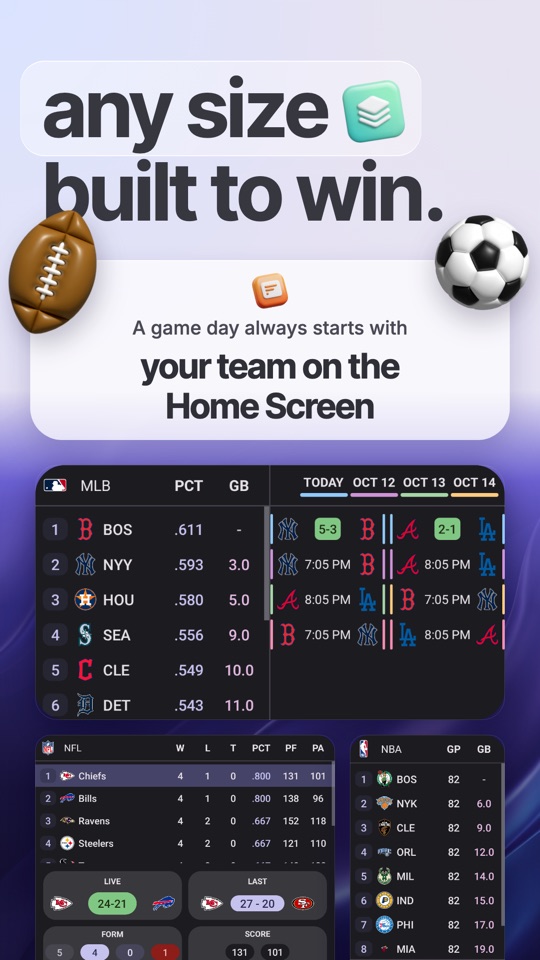 render
Add the set and say what to take from it
Match this set: docs/screenshots/references/board.jpg.
Take its layout and type, keep our own colours and content.
Use the store-art-studio skill and start with the style tile.
It measures, then loops until the gap is small
The agent cuts the board into slots, reads margins, baselines, type size and palette with probe.swift, and builds a style tile for your approval. Then it renders, compares, writes a difference list by category and fixes it, repeatedly.
Add a near-miss when it is wrong
Save the failed attempt as zz-rejected-<reason>.png beside the reference and say what is wrong with it. It becomes a negative reference and is never repeated.
Asset Library
Generate
3D clay glyphs for pill tiles, objects that fit your app, stickers, hands holding a plain slab, a scene or light behind a device, glow around a real card.
Never generate
Readable UI, tables, figures, buttons, any text or numbers, Apple hardware, logos, real brands, real people, proportion-critical chrome like a search bar.
Three assets made with the skill's own recipe
Generated on flat magenta, keyed to alpha with chromakey.swift. These are the three used in the thank-you note on the overview.

star.png
gpt_image_2_5, 1:1, count 2
In the repo
heart.png
keyed with --spill 0
In the repo
gift.png
pastel lilac, soft yellow ribbon
In the repoThe sticker prompt
Glossy soft-3D clay render of <single object>, <colour and one distinguishing detail>, slightly
tilted, soft studio lighting from top left, gentle ambient occlusion, playful premium app-icon
style, matching a set of 3D clay <family>. No logos, no text, no brand marks. Centered, filling
70% of the frame. Solid flat #FF00FF background, no shadow on the background.
Key it, then record where it came from
swift scripts/screenshots/tools/chromakey.swift in.png out.png --key "#FF00FF" --crop
Every generated asset is recorded in a provenance file next to it: model, prompt, generation id and credits.
Product Page Optimization
Original product page
screenshots
Treatment: Localized art
ppo.rb creates this through the App Store Connect API and never starts the test. Starting it sends the treatment to App Review, which you do on purpose.
Before anything leaves your machine
Add the lanes
SKILL=~/.claude/skills/store-art-studio
cp $SKILL/templates/fastlane/screenshots.yml .
cat $SKILL/templates/fastlane/Fastfile.snippet.rb   # paste inside platform :ios do ... end
screenshots.yml lives at the repo root and lists your markets, slots and the upload approval list. Then:
fastlane render slot:Sample locales:en-US
fastlane verify
fastlane upload locales:en-US          # shows the HTML preview and asks first
Experiments and product page headers cannot go through deliver. scripts/ppo.rb does them through the API. Details in references/fastlane-and-delivery.md.
Stage, dry run, then you upload
store/page/tools/render-all.sh en-US
store/page/tools/stage-play.sh en-US       # --variant <name> ships an alternate slot 1
fastlane upload_art locales:en-US validate_only:true   # dry run, nothing changes
fastlane upload_art locales:en-US                      # the real upload: you run it
phoneScreenshots/      01.png .. 08.png, 1080 x 1920, no alpha
featureGraphic.png     1024 x 500, no alpha
wearScreenshots/       only with "wear" in surfaces: square, raw watch UI
Play submission checklist
- The language exists on the store listing before you upload to it.
- Only if you ship a Wear OS app or tile: Wear OS screenshots are square raw captures of the watch UI: no frame, mask, background or added text, a few distinct states.
- AI declaration: Play asks whether assets were made or edited with AI. Label every asset with generated art (photos, avatars, 3D objects, backgrounds). Raw UI captures need no label. For example: "Background photography, illustrated characters and 3D decorative objects were generated with AI. All app screens are rendered from the app's real interface." Follow Play's own definitions.
- No user counts, ratings or awards unless you ask for one and can back it. The template has none.
- No real people, no brands you do not own.
The full checklist, with tablets and the pull-back comparison, is in docs/android-end-to-end.md.
Prompts
Start a real job
Use the store-art-studio skill. Discover this project, ask me what you cannot read
from it, and write the brief. Platform: <iOS or Android>.
Add the files to the Xcode target
Add the files under StoreArt/ to the StoreArt unit test target by hand-editing project.pbxproj:
a PBXFileReference, a group entry, a PBXBuildFile and a Sources entry per file, fresh 24-hex ids.
Do not use the xcodeproj gem. Build after each edit and tell me when it compiles.
Match a set I like
Match this set: docs/screenshots/references/board.jpg.
Take its layout and type, keep our own colours and content.
Use the store-art-studio skill and start with the style tile.
Localize an approved set
The default market is approved. Roll out to <locales>, one market at a time.
Write each language as if authored there, run the width tests, and list which copy
needs native review. Do not render markets I did not name.
Build the Android half
Use the store-art-studio skill for Google Play, following docs/android-end-to-end.md and
templates/android/START-HERE.md in the skill folder.

1. Discover: read this project (modules, navigation and screens, view models, the manifest,
   widgets, notifications, Wear OS, string files per locale, brand, any fastlane metadata) and
   summarise what you found. Do not build or run anything.
2. Ask me only what the project cannot answer, in batches with your recommended option first:
   features and their order, surfaces to show, design direction, first market, my copy rules,
   the art budget and kind, who uploads.
3. Write docs/screenshots/brief.md and store/storeart.config.json (my first market only,
   "upload": false, "surfaces" as I chose), then stop for my approval.

Before you edit any Gradle file in Gate 0, tell me what this project uses (AGP, Kotlin, compileSdk,
Compose BOM, Glance, Coil, JDK, any screenshot library) and the exact changes, and wait. Never run
my real app, an emulator signed in to a real account, or anything that syncs.
Files
| Name | Type | What it is |
|---|---|---|
SKILL.md | Skill | The contract: layers, hard rules, gates, review loop, slop checklist |
index.html | Guide | This page. Built from site/ |
INSTALL.md | Guide | The same guide as plain text |
README.md | Guide | What the skill is and what is verified |
docs/android-end-to-end.md | Guide | Android by phase: discover, ask, brief, draft, iterate, localize, ship, and the Play checklist with Wear OS and the AI declaration |
references/architecture.md | Reference | Layers, repo layout, the slot pattern, naming, the world |
references/ios-swiftui-renderer.md | Reference | Building the host-less target, every trap with its fix |
references/android-compose.md | Reference | Compose, Glance widgets and Play, every trap with its fix |
references/higgsfield-art.md | Reference | What to generate, MCP flow, keying and compositing recipes |
references/discovery.md | Reference | Reading a project on iOS and Android, the question bank, writing the brief |
references/iteration.md | Reference | Feedback rounds, the decision log, when to stop |
references/style-and-copy.md | Reference | Default palette, type, pill, archetypes, localization rules |
references/reference-matching.md | Reference | How to match a set you share, step by step |
references/fastlane-and-delivery.md | Reference | deliver, Product Page Optimization, headers, safety checklist |
templates/ios/ | Template | StoreArt kit, sample slot and tests. Compiles and renders 1320 x 2868 |
templates/fastlane/ | Template | screenshots.yml manifest and the lanes |
templates/brief-template.md | Template | The brief the skill writes in phase 3, or that you fill by hand |
templates/android/START-HERE.md | Template | The files to copy, the first 30 minutes, and the first prompt |
scripts/chromakey.swift | Script | Key a flat colour out of generated art, with despill |
scripts/cutout.swift | Script | Vision foreground cutout |
scripts/screenswap.swift | Script | Warp a rendered screen onto a green slab in a photo |
scripts/compare.swift | Script | Reference left, render right, shared guides |
scripts/probe.swift | Script | Measure colours, ink bounds and text rows in any PNG |
scripts/verify-export.sh | Script | Exact sizes and no alpha, before every upload |
scripts/ppo.rb | Script | Product Page Optimization and header upload through spaceship |
site/ | Source | The source of this page: index.template.html and build.py, which writes index.html |
vercel.json | Config | Static hosting settings for this page |
assets/ | Assets | The app icon, the example screenshots this page shows, and the 3D art in the thank-you note; the icon and the art carry their provenance |
Licences. Inter and Inter Tight are bundled under the SIL Open Font License. Apple bezels, provider images and anything generated under your own Higgsfield account are yours to license and are not included. The iOS template compiles and renders; the Android pipeline is proven in production and its generic template is new.